.png)
.png)

.svg)
Passive · Non-Blocking · Risk-Free
See Every Threat.
Before You
Stop a Single One.
RansomObserver deploys RansomArmor's full detection engine on real production endpoints — with enforcement off. Silently log every would-be block. See exactly what your RA will flag. Build a verified allow-list from real data. Switch on enforcement in one click. Deploy your RA with zero surprises, zero downtime.
0
Files
Blocked
Blocked
<
3%
CPU
Overhead
Overhead
<
1s
Event
Latency
Latency
~
2wk
Eval Period
0
Cost
added
added
.png)
.png)
Why RansomObserver
Deploying ransomware protection blind is a costly mistake
Every ransomware agent sees your ERP, SAP, or internal tools as threats. Most enterprises discover this after enforcement is live — when the help desk floods with blocked processes. RansomObserver silently logs every would-be block for 2 weeks, lets you inspect the report transparently, and arms you with a real allow-list before you activate protection. Then the switch to RA is instant — and 100% clean.
.svg)
.svg)
The RansomObserver Advantage
See the full picture beforeyou flip the enforcement switch
Every ransomware agent will block your business software. The question isn't whether— it's whether you know before your users hit the wall. RansomObserver answers that in 2 weeks with a transparent allow-list report. You review what would have been flagged. Then activate your RA with a single click, on a schedule you control, with zero production risk. That's the difference between a rollback disaster and a clean deployment.
.svg)
Transparent Report
Export and inspect every would - be block. See exactly what your RA will flag.
.svg)
One-Click Activation
Switch from observation to enforcement in seconds. No redeployment. No restarts.
.svg)
Zero-Risk Rollout
Every threat logged. Every false positive absorbed. Day one production-ready.
KEY features
Comprehensive pre- deployment threat visibility
With zero enforcement risk, RansomObserver gives IT teams the data they need to deploy RansomArmor with confidence — from day one.
.svg)
Zero-Disruption Evaluation
Deploy on real production endpoints without blocking or quarantining a single file. The enforcement pathway is architecturally absent — not disabled,never built.
.svg)
100% RansomArmor DetectionParity
Runs the same kernel-level AI engine as RansomArmor. Every event RA would flag, RansomObserver logs — ensuring your allow list reflects reality, not approximations.
.svg)
1-Click Allow List Export
Generate a deduplicated .xlsx allow list in the exact RansomArmor Director import schema. Imports on first try — no reformatting, no field mapping required.
.svg)
ObserverDirector Portal
A dedicated console for your evaluation
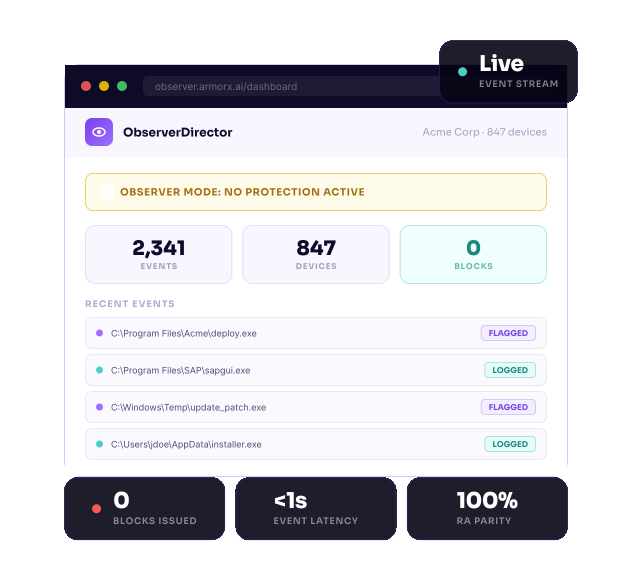
Separate URL from your RansomArmor Director. Tenant admins get a real-time event feed, site and device fleet management, behavior report generation, and one-click allow list export — all in one purpose-built portal.
A non-dismissible OBSERVER MODE: NO PROTECTION ACTIVE banner persists on every page. A mandatory acknowledgment dialog appears on every login. This is not a setting — it is an architectural constraint.
Available For
How it works
From install to RansomArmor in 4 simple steps
The entire evaluation happens on real infrastructure, with real users,
without a single disruption.
without a single disruption.
1
📦
Deploy RansomObserver Agent
Install silently on representative endpoints via GPO, SCCM, Intune, or manual MSI. Device users see nothing — no prompts, no UI, no disruption. Agent registers with ObserverDirector within 60 seconds of install.
Supported deployment methods: Group Policy (GPO) ·Microsoft SCCM · Microsoft Intune · Manual MSI (local admin) ·Custom scripting via CLI flags
1
Deploy RO Agent
Install silently via GPO, SCCM, or MSI. Users see nothing. Agentchecks in within 60 seconds.
2
Observe & Collect
Run for ~2 weeks. Every would-be block is logged and streamed to ObserverDirector in under 1 second.
3
Export Allow List
One-click .xlsx in the exact RA Director import schema. Deduplicated. No reformatting needed.
4
Activate RansomArmor
Import the list. Uninstall RO. Switch on RA. All accounts, sites, and data carry over automatically.
2
🔭
Observe & Collect
Run across your real endpoint fleet for approximately 2 weeks. Every process RansomArmor would flag is logged and streamed to ObserverDirector in under 1 second— giving you a live, deduplicated picture of your software estate.
Captured per event: File path · SHA-256 hash· Detection reason (heuristic / behavioral /signature) · Device identity · Timestamp
1
Deploy RO Agent
Install silently via GPO, SCCM, or MSI. Users see nothing. Agentchecks in within 60 seconds.
2
Observe & Collect
Run for ~2 weeks. Every would-be block is logged and streamed to ObserverDirector in under 1 second.
3
Export Allow List
One-click .xlsx in the exact RA Director import schema. Deduplicated. No reformatting needed.
4
Activate RansomArmor
Import the list. Uninstall RO. Switch on RA. All accounts, sites, and data carry over automatically.
3
📊
Export Your Allow List
Once you're satisfied with coverage, generate your allow list in a single click. The .xlsx output uses the exact schema RansomArmor Director expects — no reformatting, no field mapping, noback-and-forth with the vendor.
Export includes: Deduplicated file paths ·SHA-256 hashes · Detection reason per entry· Ready to import on first try
1
Deploy RO Agent
Install silently via GPO, SCCM, or MSI. Users see nothing. Agentchecks in within 60 seconds.
2
Observe & Collect
Run for ~2 weeks. Every would-be block is logged and streamed to ObserverDirector in under 1 second.
3
Export Allow List
One-click .xlsx in the exact RA Director import schema. Deduplicated. No reformatting needed.
4
Activate RansomArmor
Import the list. Uninstall RO. Switch on RA. All accounts, sites, and data carry over automatically.
4
🛡️
Activate RansomArmor
Import the allow list into RansomArmor Director. Uninstall RansomObserver. Switch RA to enforcement mode. All accounts, sites, devices, admin identities, and event logs carry over automatically — zero re-configuration.
Seamless transition: All ObserverDirectordata migrates to RA Director automatically.Your evaluation investment is preserved end-to-end.
1
Deploy RO Agent
Install silently via GPO, SCCM, or MSI. Users see nothing. Agentchecks in within 60 seconds.
2
Observe & Collect
Run for ~2 weeks. Every would-be block is logged and streamed to ObserverDirector in under 1 second.
3
Export Allow List
One-click .xlsx in the exact RA Director import schema. Deduplicated. No reformatting needed.
4
Activate RansomArmor
Import the list. Uninstall RO. Switch on RA. All accounts, sites, and data carry over automatically.
.svg)
Go Live With Confidence
Enhance ransomware resilience
After ~2 weeks of silent observation, you'll have a complete,deduplicated allow list built from real production behavior— not sandbox guesses. Import it into RansomArmorDirector with one click, and go live knowing your legitimatesoftware estate is fully protected.